Connect ChatGPT Plus to self-hosted WordPress.
A source-checked, OAuth-only setup for adding your own WPPilot MCP endpoint as a custom ChatGPT app-without giving a chatbot a shared administrator password.
ChatGPT connection profile
Remote OAuth
Reviewed 24 August 2026. Client menus and plan gates can change; compare this article with the live screens.
Read the tutorial article →Before you start
This is a remote cloud connection.
ChatGPT does not run inside your WordPress dashboard. It reaches the WPPilot MCP endpoint from OpenAI's infrastructure, then WordPress decides what the authenticated user and active safety policy may do.
- A self-hosted WordPress site running WordPress 6.9 or newer and PHP 8.0 or newer
- WPPilot Free installed and active
- A domain ChatGPT can reach over public HTTPS; localhost and private LAN URLs do not work
- An eligible ChatGPT web account with Developer mode available
- A dedicated WordPress user with the smallest useful role
- WPPilot left on Read Only for the first connection test
Real WPPilot screen
Generate the route inside WordPress.
This is a genuine capture of WPPilot Free 1.6.4 on the local test site, cropped to remove the WordPress account bar and unrelated administration. The localhost endpoint shown proves the installed interface, but ChatGPT cannot reach it; generate a public HTTPS endpoint on the site you intend to connect.
Step-by-step tutorial
Connect the site in six deliberate steps.
Generate every URL and authorization request from the site being connected. Public examples are for shape only; they are never credentials.
- 01
Prepare the WordPress identity
Create a dedicated WordPress user for this connection. Do not reuse your everyday administrator account. Open WPPilot, keep the safety profile on Read Only, and confirm the site is reachable through a trusted public HTTPS certificate.
- 02
Generate the ChatGPT route in WPPilot
Open WPPilot → Connect, choose ChatGPT, and select OAuth 2.1. Copy the complete MCP server URL generated by this WordPress install. Do not copy an example-domain URL from an article.
- 03
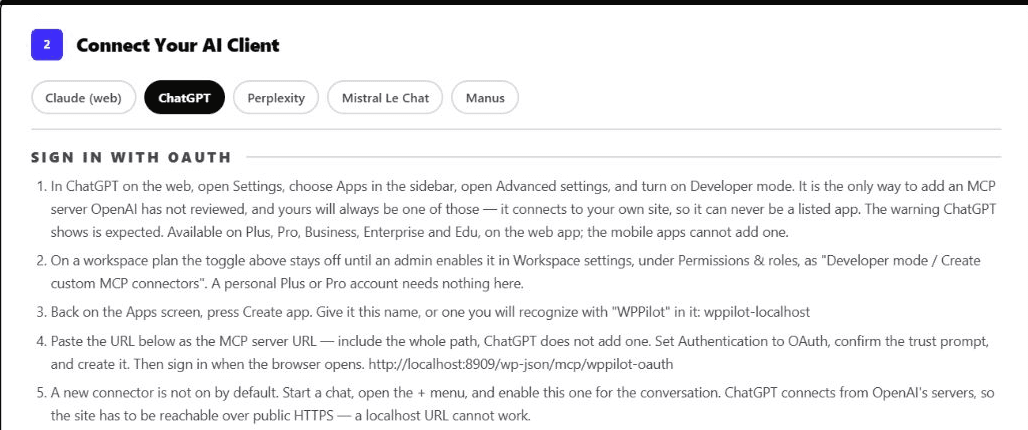
Enable Developer mode in ChatGPT
In ChatGPT on the web, open Settings, choose Apps, open Advanced settings, and enable Developer mode. OpenAI currently lists custom MCP for Plus and Pro, but personal plans are limited to read and fetch; full write-capable MCP is currently limited to Business and Enterprise/Edu. Managed workspaces can require an administrator to allow custom apps first.
- 04
Create the custom app
Return to Apps and choose Create app. Use a clear name such as ‘WPPilot: Example Site’. Paste the entire WPPilot URL as the MCP server URL, choose OAuth authentication, review the trust warning, and create the app.
- 05
Authorize in WordPress
ChatGPT opens the WordPress authorization flow. Sign in as the dedicated user, review the requested connection, and approve it. The connection inherits that user's WordPress capabilities and remains subject to WPPilot policy on every call.
- 06
Enable the app in one chat and test read-only
Start a new chat, open the add-tools or plus menu, and enable the WPPilot app for that conversation. Ask for the active safety profile, available abilities, and one non-sensitive page. Require the response to state that it made no changes.
Copy this first prompt
Prove the read path before a write.
A good first test exercises the endpoint, OAuth session, tool discovery, schema retrieval, WordPress capability checks, and structured results without changing the site.
Use the WPPilot app for this request only.

1. Report the active WPPilot safety profile.
2. List the abilities available to this connection.
3. Inspect the schema for one read-only content ability.
4. Read one public page and identify its WordPress ID, title, and status.
5. Do not write, publish, upload, install, delete, or invoke developer tools.
6. Report any connection, authentication, or permission error exactly.
Troubleshooting
Diagnose the layer that actually failed.
Do not solve an endpoint problem by widening WordPress authority. Keep reachability, authentication, authorization, discovery, and execution separate.
| Symptom | What to check |
|---|---|
| The app cannot reach the server | Confirm the MCP URL uses the public domain and HTTPS. A cloud-hosted ChatGPT connection cannot call localhost, 127.0.0.1, a private IP, or a site hidden behind an unconfigured firewall. |
| Developer mode is missing or disabled | Use ChatGPT on the web and verify that the account or workspace is eligible. On a managed Business, Enterprise, or Edu workspace, ask an administrator whether custom MCP apps are allowed. |
| Authorization loops or returns to sign-in | Regenerate the route from the current WPPilot Connect screen, verify the public site's canonical HTTPS URL, disable conflicting redirect or security rules temporarily on staging, and inspect the exact OAuth error. |
| The app exists but ChatGPT does not use it | Enable the app for the current conversation from the add-tools or plus menu. Creating a custom app does not necessarily enable it in every chat. |
| A tool is missing | Check WPPilot's active safety profile, the ability switch, the connected WordPress user's capabilities, plugin dependencies, and Pro licence state. Then begin a fresh chat so ChatGPT refreshes the tool list. |
ChatGPT + WordPress FAQ
The boundaries most tutorials omit.
The current setup path is source-reviewed. A successful local build does not prove that an account gate, host firewall, OAuth redirect, or production policy will pass.
Can ChatGPT Plus connect to self-hosted WordPress through MCP?
Yes, when custom MCP and Developer mode are available in the live ChatGPT web account. OpenAI's current plan guidance lists custom MCP for Plus and Pro, with personal plans limited to read and fetch. The WordPress site must be reachable over public HTTPS.
Can ChatGPT Plus publish or edit WordPress through this connection?
Not under OpenAI's current personal-plan boundary. Full write-capable MCP is currently limited to Business and Enterprise/Edu. On Plus or Pro, use this tutorial for read-only discovery and content retrieval; do not promise editing or publishing even if WPPilot exposes write abilities.
Can ChatGPT connect to a localhost WordPress site?
No. ChatGPT calls the MCP server from OpenAI's cloud, so localhost, 127.0.0.1, and private-network addresses are not reachable. Use a public HTTPS staging site or a deliberately configured secure tunnel supported by your environment.
Do I paste an Application Password into ChatGPT?
No. WPPilot's ChatGPT route is OAuth-only because the custom-app form does not provide a static Authorization-header field. Keep passwords and tokens out of prompts and screenshots.
Does ChatGPT receive administrator access?
Only if you connect it as an administrator, which this guide advises against. Every request authenticates as the selected WordPress user and is also checked against the WPPilot safety profile, enabled abilities, rate limits, and critical-action confirmation.
Is WPPilot an OpenAI-maintained connector?
No. WPPilot is a self-hosted WordPress plugin and the custom app points ChatGPT to your own site's MCP endpoint. OpenAI has not reviewed or endorsed that private endpoint; the custom-app trust warning is therefore expected.
Should I let ChatGPT publish on the first test?
No. Prove endpoint reachability, OAuth, discovery, schema retrieval, and one non-sensitive read first. If the account and workspace later support full MCP writes, test one reversible draft on staging before considering broader authority.
Reviewed sources
What this tutorial is based on.
- OpenAI's Developer mode and MCP apps guidance for current plan boundaries, menu paths, managed-workspace controls, and read/write availability.
- Official OpenAI MCP and connectors guidance for remote-server reachability, approvals, and third-party MCP risk.
- WPPilot's shipped ChatGPT connection steps for the current menu path, OAuth route, and first-chat enablement.
- WordPress MCP Adapter introduction for the Abilities-to-MCP architecture used by the plugin.
WPPilot is not affiliated with or endorsed by OpenAI. ChatGPT is a trademark of OpenAI. WordPress is a registered trademark of the WordPress Foundation.
Your site · your policy · your AI client
Start with one read-only ChatGPT conversation.
Install WPPilot Free on a public HTTPS staging site, connect a dedicated WordPress identity, and verify one real page read. Consider wider authority only on a plan and workspace where OpenAI enables full MCP writes.