Install Free
Download the current GitHub release, upload it in WordPress and activate it. Confirm the version and requirements in WPPilot before connecting.
Start with the actual WPPilot MCP server, not a demo form. Install Free from the public GitHub release, keep the first connection read-only, and verify one real WordPress result.
First success
Do not enable broad writes just to make setup feel complete. A limited successful connection is the useful starting point.
Download the current GitHub release, upload it in WordPress and activate it. Confirm the version and requirements in WPPilot before connecting.
Create a dedicated WordPress user, choose your actual client guide, and copy the complete endpoint generated by your own site. Begin on Read Only.
Discover the live ability list, inspect one schema, read one known draft or setting, and compare the result with WordPress. Record versions and any limitation.
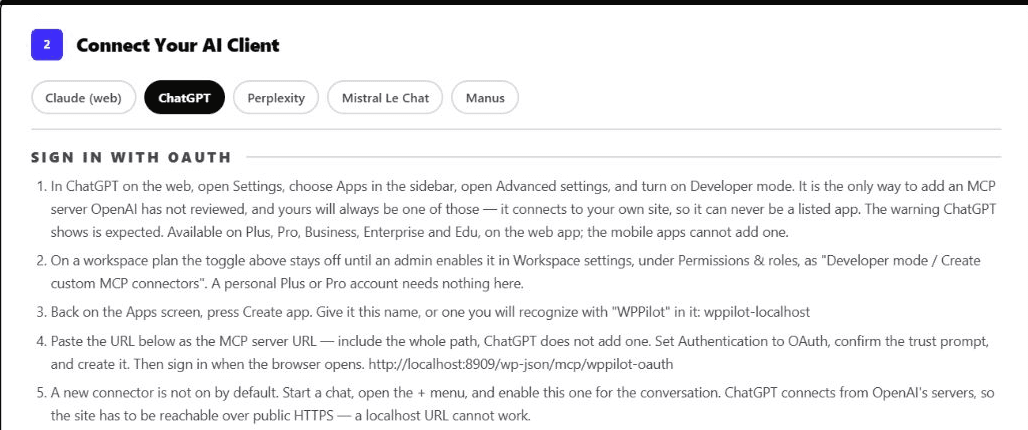
Real Connect screen
This captured WPPilot Connect view shows the client-specific instructions and the full OAuth route. The localhost URL in the image is a development example, not a public endpoint and not proof that your connection succeeded.
Choose your client
Client names, eligibility, settings and transport support change. Use the guide for the exact client surface you are testing.
Know the boundary
A useful first run has a narrow acceptance test. Keep product capability, client compatibility, permissions, and the finished website result as separate checks.
You can expose typed WordPress abilities through MCP, discover the live registry and schemas, apply the connected user's permissions, select a safety profile, inspect diagnostics, and review supported change evidence. Those controls let you test the connection without purchasing Pro or granting an AI client an unrestricted administrator session.
A returned tool result does not prove a page looks correct, a form email arrived, a payment settled, a cache cleared, or every plugin version is compatible. For write workflows, use staging, confirm the exact target, keep a recovery path, and inspect the native WordPress editor, public route, responsive layout, and external provider involved.
No. It is the GPL WordPress MCP foundation. It does not expire. Pro is a separate licensed plugin layer for specialized integrations, memory, approvals, notifications, and integration health.
Not for the first test. Create a dedicated WordPress identity with the smallest useful role, leave WPPilot on Read Only, and prove discovery and one safe read before considering broader permissions.
No. Installation proves only that WordPress loaded the package. Complete the connection in the actual client, list the available abilities, perform a read, and verify the returned WordPress record.
Your site · your policy · your AI client
Start with the free MCP foundation, then add Pro depth for the plugins and operational controls your stack needs.